Running out of storage space on your iPhone can be frustrating, especially when you want to take more photos or download apps. A USB memory stick for your iPhone offers a simple solution by giving you extra storage that you can carry anywhere. These small devices plug directly into your phone and let you move files off your device to free up space.
The best iPhone flash drives in 2026 work with both newer USB-C models like the iPhone 15 and 16, as well as older Lightning port devices, and offer storage from 32GB to 512GB or more. You can find options starting around $27 for basic models and going up to $93 for premium drives with advanced features. Most modern iPhone flash drives use USB 3.0 technology, which means they transfer your files much faster than older versions.
Picking the right flash drive for your iPhone depends on what you need. You should think about how much storage space you want, whether you need password protection for your files, and if the drive is certified to work properly with Apple devices. This guide breaks down the top options available right now and helps you choose the one that fits your needs and budget.
Key Takeaways
- iPhone flash drives provide extra storage space ranging from basic 32GB models at $27 to premium 512GB options at $93
- Modern iPhone flash drives support both USB-C ports on newer iPhones and Lightning ports on older models with fast USB 3.0 transfer speeds
- Important features to look for include adequate storage capacity, Apple certification, password protection, and compatibility with your specific iPhone model
Key Features to Consider in iPhone Flash Drives
When shopping for an iPhone flash drive, you need to focus on four main aspects: how much storage space you need, which port type matches your device, how fast it transfers files, and whether the build quality will last.
Storage Capacity and Use Cases
Flash drives for iPhones typically range from 32GB to 1TB. A 128GB flash drive works well if you mainly store photos and documents. A 256GB flash drive gives you enough room for thousands of photos and hours of video footage.
If you shoot a lot of 4K video or have years of content to back up, you’ll want 512GB or more. The 1TB options cost significantly more but make sense for professional photographers or videographers. Smaller capacities like 32GB or 64GB are budget-friendly but fill up quickly with modern iPhone photo and video files.
Think about your actual backup needs before buying. Most people find that a 256GB option hits the sweet spot between cost and capacity.
Interface Types: Lightning, USB-C, and USB-A
Your iPhone model determines which connector type you need. iPhones 14 and earlier use Lightning ports. The iPhone 15 and newer models switched to USB-C.
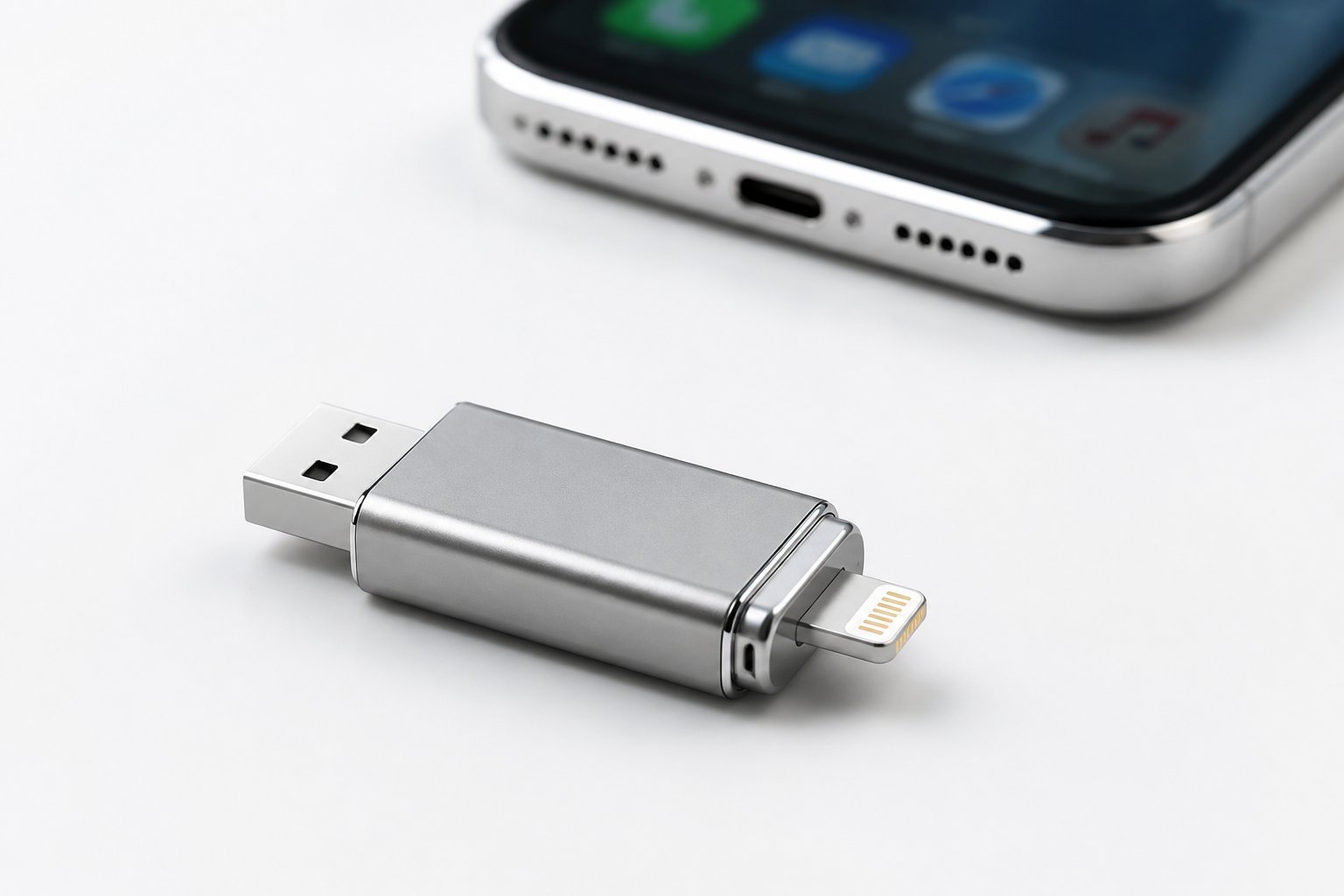
Many drives include both Lightning and USB-C connectors on opposite ends. This dual-connector design lets you transfer files between older and newer iPhones. Some drives also feature USB-A connectors for plugging into standard computers.
USB 3.0 flash drives offer faster speeds than older USB 2.0 models when connected to compatible ports. Check that any drive you buy has MFi certification from Apple if it includes a Lightning connector. This certification ensures the drive works properly with iOS and won’t damage your device.
Transfer Speed and Performance
Transfer speeds directly affect how long backups take. USB 3.0 and USB 3.1 drives deliver speeds up to 400MB/s in ideal conditions. At these speeds, you can move several gigabytes of photos in just a few minutes.
Slower drives with USB 2.0 technology transfer at around 30-60MB/s. This means a backup that takes 5 minutes on a fast drive could take 30 minutes or more on a slower one. Look for drives that specifically mention USB 3.0 or higher in their specifications.
Real-world speeds often run lower than advertised maximums. Read and write speeds also differ, with read speeds typically being faster.
Durability and Design
A good iPhone flash drive needs a sturdy build since you’ll plug and unplug it frequently. Metal enclosures hold up better than plastic ones over time. Some drives feature folding designs that protect the connectors when not in use.
The physical size matters too. Compact jump drives fit easily in pockets or bags. Longer designs can help reach ports on the back of desktop computers.
Water resistance and shock protection add extra security for your data. Some drives include password protection and encryption features to keep your files secure if the drive gets lost or stolen.
Top-Rated iPhone USB Flash Drives in 2026
The best iPhone flash drives combine MFi certification with multi-device compatibility and fast transfer speeds. Options range from budget-friendly 128GB models to high-capacity 512GB solutions designed for professional photographers and content creators.
Best Overall Performance Options
The SSK 256GB Dual USB C Flash Drive leads in performance with read speeds up to 550MB/s and write speeds of 500MB/s. This USB 3.2 Gen2 drive uses solid-state technology, making it 10 times faster than standard USB 3.0 flash drives.
For reliable cross-device use, the Lexar D40E offers transfer speeds up to 100MB/s with its swivel design protecting both USB-A and USB-C connectors. The metal housing provides durability that plastic alternatives lack.
The JOIOT 128GB USB C Flash Drive delivers consistent performance with read speeds of 130MB/s and write speeds of 35MB/s. Its dual-ended design eliminates the need for adapters when switching between devices. This jump drive works with iPhone 15 and 16 series, Android phones, tablets, and computers without requiring separate apps for different platforms.


High-Capacity Solutions for Photos and Videos
The Techkey 256GB flash drive provides substantial storage for 4K videos and high-resolution photos with its MFi-certified Lightning, USB, and Type-C interfaces. The drive includes metal construction with drop-proof and anti-magnetic protection. You can back up entire photo libraries without worrying about running out of space.
ROSPE’s 512GB options handle professional workflows where massive file sizes are standard. These iPhone photo stick models feature one-click backup through the EASYFLASH PRO app for iOS devices. Android users simply need OTG enabled without downloading additional software.
The BLANBOK+ 512GB iPhone flash drive uses the LuxSync PRO app for iOS management while maintaining compatibility across multiple platforms. Its high-temperature resistance and water-resistant design protect stored content during travel or outdoor shoots.
Best Value and Budget Choices
The ROSPE 128GB MFi Certified Flash Drive at under $30 provides essential functionality without premium pricing. You get the ROSPE app for iPhone management and plug-and-play Android compatibility through OTG.
GNASEET’s 256GB photo stick offers password protection and encryption features typically found in pricier models. The separate password function secures private files within the app while maintaining fast transfer speeds for everyday use.
These budget thumb drives sacrifice some transfer speed compared to premium options but still handle typical photo and video backups efficiently. Most include keychain designs for portability and metal construction that resists daily wear better than plastic alternatives.
Specialty Flash Drives for Unique Needs
The ZARMST 256GB includes Touch ID integration for biometric security beyond standard password protection. This feature appeals to users storing sensitive documents alongside personal photos.
The BLANBOK+ metallic silver models emphasize portability with independent adapters for each connector type rather than rotating mechanisms. This design lets you leave one adapter connected to a computer while using another with your phone.
Temperature-resistant drives from SSK and BLANBOK+ maintain performance in extreme conditions from cold mountain environments to hot vehicles. These specialized jump drives cost slightly more but prevent data corruption when standard flash drives would fail.
Comparing Popular Brands and Models
SanDisk, PioData, and PhotoStick dominate the iPhone flash drive market, each offering different strengths in storage capacity, compatibility, and price. Real user feedback reveals how these devices perform in daily use.
Pros and Cons of Leading Devices
SanDisk leads with reliable performance and wide device compatibility. The Ultra Dual Drive Go offers USB-C and USB-A connections with 400MB/s transfer speeds. It comes in sizes from 32GB to 1TB and works with iPhone 15 and newer models. The iXpand Flash Drive Luxe adds password protection for your files. However, SanDisk drives cost more than budget options.
PioData iXflash stands out for large storage needs. The 1TB model includes both Lightning and USB-C connectors, letting you transfer files between old and new iPhones. The dedicated backup app makes saving files simple. You’ll pay premium prices for 1TB capacity, but smaller sizes cost less.
PhotoStick Omni focuses on automatic photo backups. You plug it in and the device finds your photos without extra steps. It works with Lightning port iPhones but newer models with USB-C need different options. The simplicity comes at a higher price than basic drives.
User Experience and Reviews from Amazon Prime
Amazon Prime customers rate SanDisk drives highly for durability and consistent performance. Users report successful transfers of thousands of photos without errors. Some mention the drives get warm during large file transfers, but this doesn’t affect speed.
PioData iXflash buyers appreciate the dual-port design for switching between devices. Reviews note the included app works better than generic file managers. A few users experienced slow speeds with very large video files over 2GB.
PhotoStick Omni receives mixed feedback. Many customers love the automatic backup feature that requires no setup. Others find the device expensive compared to similar storage options. The plug-and-play function works well for people who want simple iPhone USB storage without complicated steps.
How to Use a Flash Drive with Your iPhone
Using a flash drive with your iPhone requires the right adapter and a few simple steps to access your files. You’ll need to connect the drive through your iPhone’s charging port and use the Files app to manage your data.
Setup and Compatibility
You need an adapter to connect a USB memory stick to your iPhone. If your iPhone has a Lightning port, you’ll need a Lightning to USB Camera Adapter or Lightning to USB 3 Camera Adapter. If you have a newer iPhone with USB-C, you can use a USB-C adapter or directly connect compatible drives.
Plug the adapter into your iPhone’s charging port, then connect your flash drive or photo stick to the adapter. Your iPhone must be running iOS 13 or later to access external storage devices.
The drive should appear automatically in the Files app. Make sure your jump drive for iPhone is formatted as exFAT, FAT32, or APFS for proper compatibility. Some older formatting types may not work with iOS devices.
Transferring and Backing Up Photos and Files
Open the Files app and tap Browse at the bottom of the screen. Look for your connected drive under the Locations section. Tap on the drive name to view its contents.
To back up photos, open the Photos app and select the images you want to transfer. Tap the share button and choose Save to Files. Select your connected iPhone photo stick as the destination. You can create new folders on the drive to organize your content.
For backing up other files, navigate to them in the Files app and tap Select. Choose the files you want to copy, tap the share icon, and select your external drive. When you’re finished, close the Files app before unplugging your iPhone flash drive to prevent data corruption.
Security and Backup Considerations
When you store personal photos, videos, and documents on an iPhone flash drive, protecting that data becomes just as critical as protecting your phone itself. Password protection and reliable backup methods help keep your files safe from loss or unauthorized access.
Data Protection and Privacy
Most quality iPhone USB storage devices now include password protection features to encrypt your files. The SanDisk iXpand Flash Drive Luxe, for example, lets you password-protect specific files so they stay secure even if you lose the drive. This encryption creates a barrier between your data and anyone who might find your photo stick.
Look for drives that offer 256-bit AES encryption when you need maximum security. MFi-certified drives from trusted brands typically include their own apps that manage these security features.
You should also consider physical security. Some drives have retractable connectors or caps that protect the USB-C or Lightning ports from damage. A damaged connector can make your data inaccessible, even if the storage chip inside still works.
Backup Solutions for iPhone Data
Your iPhone USB storage serves as a local backup option that doesn’t require internet or monthly fees. Photo sticks can automatically scan and back up new photos and videos when you plug them in. This gives you a physical copy separate from iCloud.
Create a regular backup schedule to protect your data. Most iPhone flash drives come with apps that let you set up automatic backups. You can back up specific file types like photos, videos, or contacts.
Keep multiple backup copies when possible. Store one copy on your flash drive and another in cloud storage or on a computer. This redundancy protects you if one backup method fails.
Test your backups occasionally by trying to restore a file. This confirms your data is actually saved and accessible when you need it.
Care, Maintenance, and Buying Tips
Taking care of your iPhone USB memory stick properly extends its life and protects your data. Smart shopping habits help you avoid common mistakes and get the best value for your storage needs.
Maintaining Reliability and Longevity
You should always eject your flash drive properly through your iPhone or computer settings before unplugging it. Removing the drive while data transfers can corrupt files or damage the memory chip.
Keep your USB memory stick away from extreme temperatures and moisture. Store it in a protective case when not in use to prevent physical damage to the connectors. Many drives come with caps or retractable designs to protect both Lightning and USB 3.0 flash drive ports.
Check your drive regularly for updates if it includes software or an app. Some manufacturers release firmware updates that improve performance and security. You should also back up your flash drive data to another location since all storage devices can fail eventually.
Avoid filling your 256gb flash drive completely to capacity. Leaving 10-15% free space helps maintain faster transfer speeds and reduces wear on the memory cells.
What to Know Before Buying Online
Check that the flash drive works with your specific iPhone model before purchasing. Newer iPhones use USB-C while older models need Lightning connectors. Read the product description carefully to confirm compatibility.
Look for drives that are MFi certified (Made for iPhone). This certification means Apple has approved the device and it meets their performance standards. Non-certified drives may not work properly or could damage your device.
Compare prices across sellers, especially during Amazon Prime sales events where you can find significant discounts. Read recent customer reviews to learn about real-world performance and any common problems. Pay attention to reviews mentioning transfer speeds, build quality, and customer service experiences.
Verify the return policy before buying. Reputable sellers typically offer 30-day returns if the drive doesn’t work as expected.