Taking great photos and videos with your phone gets easier when you add a Bluetooth side handle shutter release to your setup. These tools give you better control and stability while shooting. They work by connecting to your phone through Bluetooth and letting you trigger the camera with a simple button press instead of tapping your screen.
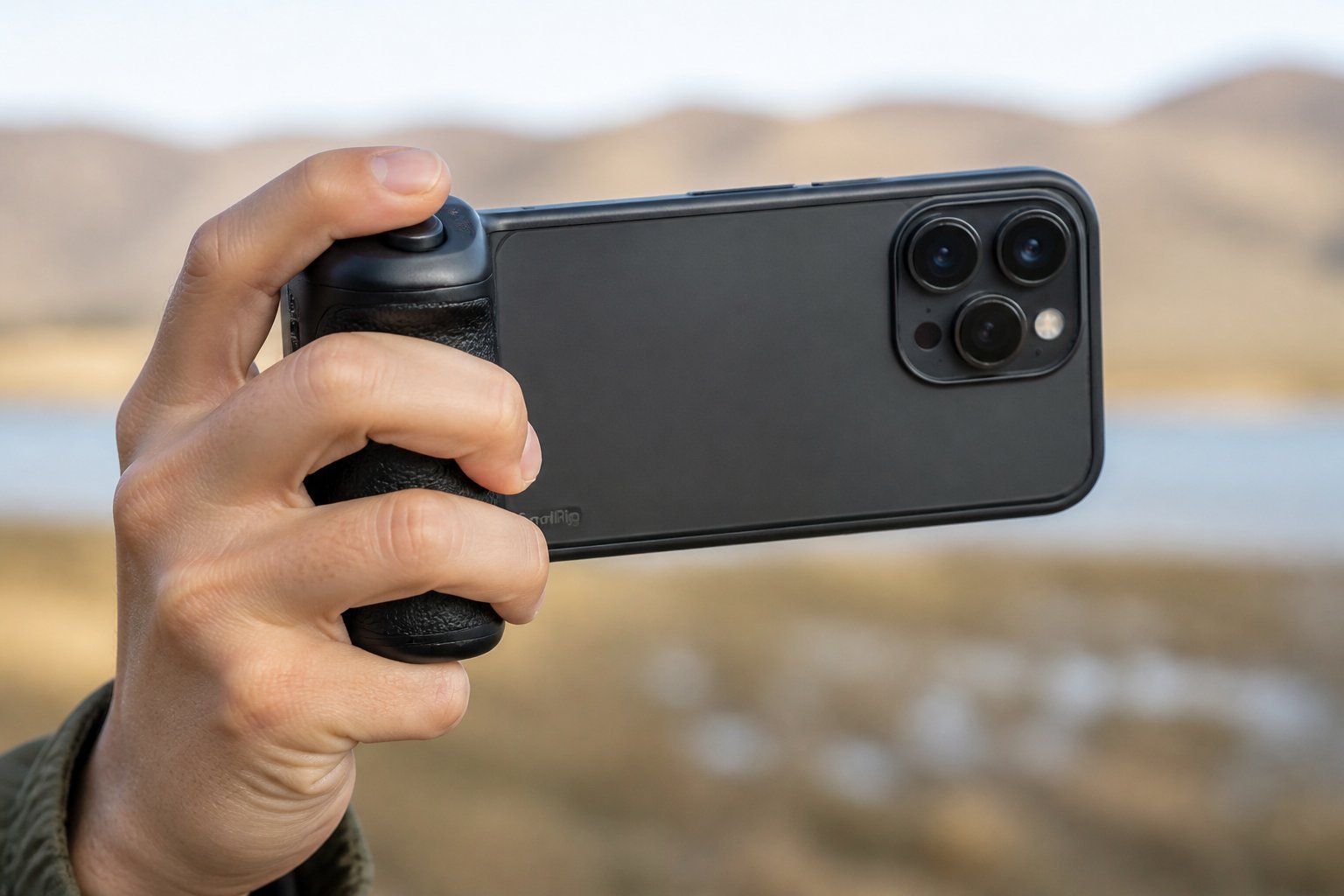
A good Bluetooth side handle shutter release combines comfortable grip design with reliable wireless connectivity and easy mounting options for your phone. Most models work with both iPhone and Android devices. They typically include features like rechargeable batteries, adjustable clamps, and cold shoe mounts for adding lights or microphones. Some can rotate 360 degrees for different shooting angles.
The best options balance price with features you actually need. You want something that feels solid in your hand and connects quickly when you turn it on. Battery life matters too since you don’t want your handle dying in the middle of a shoot.
Key Takeaways
- Bluetooth side handle shutters improve stability and control when shooting photos or videos on your phone
- Look for models with rechargeable batteries, universal phone compatibility, and adjustable mounting options
- These handles work best when they offer quick Bluetooth pairing and comfortable grip design for extended use
Key Features to Consider
When shopping for a Bluetooth side handle shutter release, you need to focus on three main areas that directly affect how well the device works with your phone. These features determine whether the handle will connect reliably, work from the distances you need, and last through your shooting sessions.
Bluetooth Connectivity and Compatibility
Your side handle must work with your phone’s operating system. Most models support both iOS and Android devices, but you should verify compatibility before buying. The pairing process should be simple and quick, usually requiring you to turn on Bluetooth, press a button on the handle, and select the device from your phone’s Bluetooth menu.
Some handles include built-in rechargeable batteries that power the Bluetooth module. These typically use a 100mAh battery that maintains the wireless connection. The shutter button sends a signal to your phone’s camera app, letting you capture photos and videos without touching your screen.
Check if the handle works with your specific phone model and camera app. Native camera apps generally work best, though many third-party apps also support Bluetooth shutter controls.
Wireless Range and Reliability
The Bluetooth connection needs to stay stable while you shoot. Most side handles maintain a reliable connection since your phone sits in the same cage or rig as the handle. This close proximity means you won’t experience the connection drops that can happen with separated remote controls.
The signal strength matters less for side handles than standalone remotes because the distance between the handle and phone stays constant at just a few inches. You can expect consistent performance whether you’re recording video, taking photos, or switching between portrait and landscape orientations.
Battery Life and Charging Options
Battery capacity determines how long you can shoot before recharging. Side handles typically use USB Type-C ports for charging, which matches most modern phones and accessories. You can often use the handle while it charges, preventing downtime during important shoots.
Look for LED indicators that show battery status and charging progress. These lights tell you when the device needs power before it dies mid-session. A full charge usually provides several hours of continuous use, depending on how frequently you press the shutter button.
Top Device Recommendations
The best Bluetooth side handle depends on your phone’s operating system and your specific filming needs. Some models work exclusively with iOS or Android, while others connect to both platforms.
Best for iPhone Users
The NEEWER PA005E Side Handle Grip works well with iPhones through its reliable Bluetooth connection. It has a built-in 100mAh rechargeable battery that pairs quickly with iOS devices. The shutter button responds fast when you’re taking photos or recording videos.
You can charge this handle while using it through the USB Type-C port. The LED indicator shows you the battery status and connection state. This makes it easy to know when you need to recharge.
The handle fits into NEEWER smartphone cages with standard mounting slots. It rotates 360 degrees, so you can position it as a side grip or switch it to work as a top handle. This flexibility helps when you’re shooting at different angles or doing low-angle shots.

- 【Wireless Bluetooth Shutter Release】 NEEWER PA005E Side Handle Grip for Smartphone Cage has a built in 100mAh rechargeable battery and a wireless shutter release module. It pairs with your iOS/Android phone via Bluetooth and lets you take photos and videos using the shutter button. The grip can be used while charging via the USB Type C port. The LED indicator can guide you through operating steps with different colors
- 【Two Targeted Mounting Adapters】 Includes 2 adapters to fit various smartphone cages. The adapter with a 1/4″ screw & locating pins is compatible with SmallRig 4077 (14 Pro Max), small rig 4075 (14 Pro), and universal 3155 CPU2391B CPU2494 accessories. The adapter with a 1/4″ screw & anti twist beveled edges fits NEEWER cages, such as, PA006 (14 Pro), PA011 (14 Pro Max), PA016 (Galaxy S22 Ultra) and PA021 (Galaxy S23 Ultra). For PA009, use its original adapter
- 【Adjustable Mounting】 Use the included L shaped hex key magnetically attached under the side handle grip for easy installation and detachment. You can mount the side handle grip on either side of the smartphone cage for left or right handed use, or adjust its vertical position based on accessory placement and center of gravity to enhance your grip experience
- 【Cold Shoe Accessory Mount & Strap Slot】 The top cold shoe can mount a microphone or an LED light for professional shooting. Compatible with rode wireless go 2 II microphones. Ideal for social media content creators and influencers on YouTube/TikTok vlogging, filming, videography, etc. You can fasten a wrist strap on the strap slot to prevent the smartphone from falling while in use
- 【Lightweight & Robust Design】 Only 6oz/172g in weight, this lightweight side handle grip made of black anodized aluminum alloy and ABS+PC plastic is sturdy as well. The ergonomic handle with nonslip rubber ensures this small video recording device to provide a comfortable and firm grasp

Best for Android Phones
The NEEWER PA028E Bluetooth Side Handle pairs smoothly with Android phones and includes an SSD holder. This extra feature lets you attach external storage like Samsung T5, T7, or T9 drives directly to your setup. You get both shutter control and expanded storage in one device.
The phone clamp adjusts from 2.2 to 3.2 inches, fitting most Android devices including Samsung and Google Pixel phones. It has cold shoe mounts on top for adding lights or microphones. The Bluetooth shutter release button works with Android’s native camera app.
The battery lasts through long filming sessions and recharges through USB Type-C. The grip is comfortable to hold during extended use.

- 【Side Handle with Bluetooth Shutter】 This side handle grip with a Bluetooth model can connect to your iOS/Android phone via Bluetooth and lets you take photos and videos with the press of the shutter release button. Perfect for filmmaking, YouTube/TikTok vlogging, live streaming, selfies, and other creations
- 【Vertical Adjustment for Balancing】 Made for enhanced handheld shooting, the side handle with a contoured shape and nonslip silicone rubber coatings offers a secure and comfortable grip. The 2″/53mm vertical adjustment helps balance the center of gravity (an L shaped hex key is included for screw tightening)
- 【Extendable & 360° Rotatable Clamps】 Two clips are 2.2″-3.2″/55-82mm adjustable and support 360 degree rotation for vertical and horizontal shooting. Inner rubber pads protect against scratches and increase stability. The phone holder is compatible with iPhone 16 Pro Max Plus 15 Pro/Pro Max Samsung Galaxy S24 S23 S22 Ultra cellphones and numerous other smartphones
- 【Suitable for Samsung T5/T7/T9 SSD】 Either holder clamp is compatible with Samsung T5/T7/T7 Shield/T9 (compatible with ProRes) as a mounting bracket and allows you to connect a portable SSD to your phone for abundant external storage space and HD video recording
- 【Built In USB Rechargeable Battery】 Integrated with a 100mAh rechargeable battery, the wireless Bluetooth shutter release side handle can be charged through the USB Type C port from a USB power adapter, portable charger, or computer
Universal Options
The NEEWER PA045E Quick Release Side Handle connects to both iOS and Android phones. It uses Bluetooth to pair with either operating system without requiring separate apps or complicated setup steps. You just turn on Bluetooth, press the pairing button, and start shooting.
This handle works with second-generation NEEWER phone cages that have quick release clamp mounting slots. The quick release system lets you attach and remove the handle fast when switching between handheld and tripod shooting. The 360-degree rotation gives you multiple grip positions.
The Xenvo Shutterbug offers a simpler alternative if you don’t need a full handle setup. This small remote button clips to your finger or attaches to selfie sticks. It works with iPhone, iPad, Android, Samsung, and Google Pixel devices.

- 【For NEEWER Phone Cages】 This Bluetooth side handle is designed for PA073 compatible with iPhone 16 Pro, PA074 16 Pro Max, PA082 S25 Ultra, and other NEEWER phone stabilizers with QR mounting slots, as phone camera photography/video recording accessories
- 【Wireless Bluetooth Shutter】 Pairs with your smartphone and lets you wirelessly take photos and videos with a push of the shutter button
- 【Fast Clamp On Attachment】 Quick release clamp swiftly attaches to the phone cage and secures with the locking knob—perfect for video recording, filmmaking, vlogging, live streaming, mobile photography, and other creations
- 【Swivel & Vertical Balancing】 360° rotatable phone handle grip doubles as a top handle for low angle shots. 2.2″/55mm vertical adjustment allows optimal balancing
- 【Anti Off Cold Shoe Mount】 Cold shoe with retractable anti off pin prevents drops, compatible with DJI Mic, CM31 Wireless Lav Mic, PL81 LED Video Light, and other photography accessories. Note: Remove Bluetooth shutter before use
Installation and Setup Tips
Getting your Bluetooth side handle working takes just two main steps: physically mounting it to your phone cage and connecting it wirelessly to your device. Most handles use either quick release clamps or standard mounting points, while the pairing process works like connecting any Bluetooth accessory.
Attaching the Side Handle
Quick release clamps are the fastest mounting option. Line up the clamp with your phone cage’s mounting slot and slide it into place. Turn the locking knob clockwise until it feels secure but don’t over-tighten.
If your handle uses a standard screw mount, thread it into the 1/4″-20 mounting hole on your cage. Make sure the handle sits flush against the cage before tightening. Test the stability by giving it a gentle shake.
Most side handles rotate 360 degrees. Position yours at the angle that feels most comfortable for your shooting style. The handle can work as a side grip for regular shooting or rotate to the top for low-angle shots. Lock the rotation mechanism once you find your preferred position.
Check that the handle doesn’t block your phone’s ports or buttons. You should still have clear access to your charging port and volume controls.
Pairing with Your Smartphone
Turn on your side handle’s Bluetooth by pressing and holding the power button for 3-5 seconds. Look for a blinking LED light that signals pairing mode.
Open your phone’s Bluetooth settings and scan for new devices. The handle will appear as a keyboard or input device with a model number like “PA045E” or “PA028E”. Tap to connect.
Your phone recognizes the shutter button as a keyboard input, specifically the volume key command. No app installation is needed for basic photo capture. Once paired, open your camera app and press the shutter button on the handle to test it. The connection should work immediately.
If the button doesn’t respond, disconnect and repair the device. Make sure your handle is charged through its USB Type-C port before troubleshooting further.
Benefits for Mobile Photography
Bluetooth side handle shutter releases make your phone work better as a camera. They give you a steady grip and let you take photos without touching the screen.
Improved Stability and Grip
A side handle adds weight and balance to your phone setup. This extra stability helps you hold your device steady when taking photos or recording video. Your shots will have less blur and shake compared to holding your phone alone.
The ergonomic design fits naturally in your hand. Most handles include textured surfaces or rubber grips that prevent slipping. This matters when you shoot for long periods or in challenging conditions.
The handle transforms your phone into a camera-like tool. You can hold it with one hand while keeping your arm closer to your body for better support. Some models rotate 360 degrees, which lets you switch between regular shots and low-angle photography. This flexibility helps you frame your subjects from different positions without awkward hand positions.
Enhanced Shutter Control
The built-in Bluetooth button lets you trigger the shutter remotely. You avoid touching your phone screen, which often causes slight movement and blur. This feature works especially well for group photos, long exposures, and self-portraits.
Your reaction time improves when you use a physical button. You can press the shutter at the exact moment you want without reaching for the on-screen control. This speed helps you capture action shots and spontaneous moments.
The button placement matches traditional camera designs. Your index finger rests naturally on the shutter release, just like holding a DSLR. This familiar position gives you more control over timing and reduces the chance of missing important shots. Most handles work with both iOS and Android devices through standard Bluetooth pairing.
Durability and Design Considerations
A Bluetooth side handle needs to withstand regular use while remaining comfortable during extended shooting sessions. The materials used and how the handle fits in your hand directly impact your filming experience.
Material Quality
Most quality Bluetooth side handles use a combination of aluminum alloy and reinforced plastic for their main structure. The aluminum parts resist bending and provide a solid mounting point for your phone cage. You’ll find that cheaper handles often crack at stress points where the grip connects to the mounting system.
Look for handles with rubberized or silicone coatings on grip areas. These materials prevent slipping and protect the handle from minor drops. The Neewer PA005E and similar models feature silicone rubber grips that maintain their texture even after months of use.
USB-C charging ports should have protective covers or recessed designs. Exposed ports collect dust and risk water damage. Check that mounting clamps use metal rather than plastic threads, as these connection points bear the most stress during filming.
Ergonomics and Comfort
The shape of the handle matters more than you might expect during long shooting sessions. Contoured designs that match your palm reduce hand fatigue. Handles with pronounced finger grooves help, but they must match your hand size to be effective.
Weight distribution affects comfort when you attach phones and accessories. A well-designed handle places the Bluetooth shutter button where your index finger naturally rests. You shouldn’t need to stretch or adjust your grip to press it.
Rotating mounts let you switch between side handle and top handle positions. This 360-degree rotation helps when you shoot at low angles or need different camera orientations. The quick release feature on models like the PA045E means you can detach the handle in seconds without tools.